Running CPU- and I/O-Bound Course Labs on k8shell
 Tomas Vitvar·
Hundreds of students, one lab session, zero patience for "it works on my machine." That was our starting point: local installs that drifted from the course image within a week, laptops with three different OS/package-manager combinations, and lab PCs where students don't have sudo. Every lab began with twenty minutes of environment triage instead of the actual exercise.
We run k8shell, a Kubernetes-native platform that provisions isolated, course-specific workspaces as pods. We self-host it in our university datacenter, and it now serves 300+ workspaces every semester. This is what that looks like in practice.
Workspaces, not installs
Each course gets a blueprint and a container image with the toolchain, datasets, and starter code already in place, plus resource limits appropriate for the lab. When a student starts a lab, k8shell provisions a pod from that blueprint on demand, and the workspace keeps running for as long as they need it. They can restart it any time and it comes back fresh from the blueprint's initial state. And since they have sudo privileges in the workspace, they can also install any additional tools or packages they need to complete their work.
Students connect using VS Code (Remote-SSH), IntelliJ, or a plain terminal through our SSH proxy using user~workspace as the username:
ssh alice~lab3@app.k8shell.dev
No gateway config beyond a normal SSH connection. That matters more than it sounds: we're not asking a lab tutor to debug someone's editor extension.
Two very different kinds of lab
"Course workload" turns out to mean wildly different things.
CPU-bound: ML labs. Training runs are bursty and resource-hungry. A student might sit idle reading a paper for twenty minutes, then use every core for the next ten. Blueprints for these courses set explicit CPU/memory limits so one student's job can't starve their labmates on the same node.
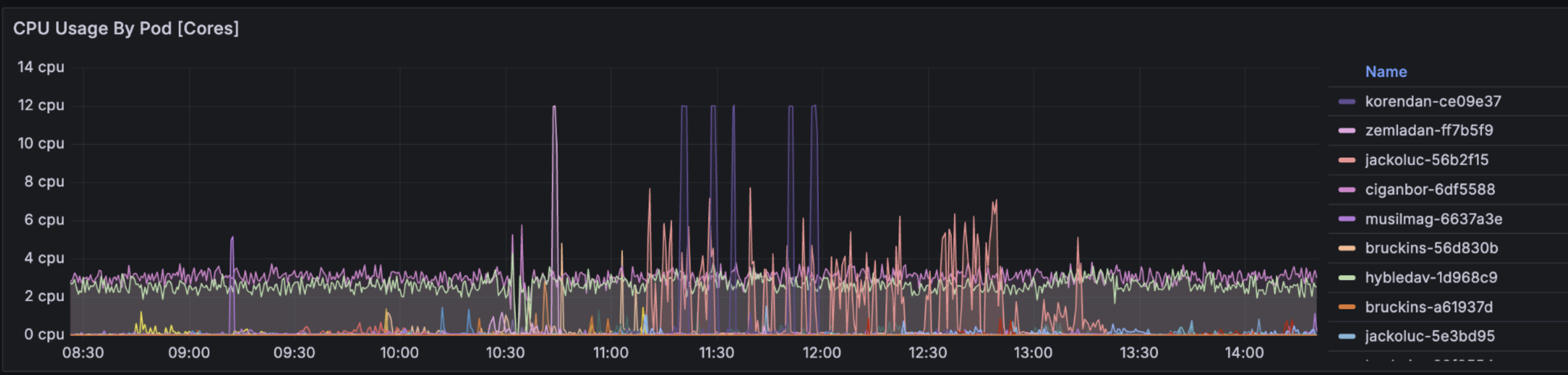
The graph above is from a live lab hour: a dozen concurrent workspaces, most idling in the low single-digit percent while a student reads or writes code, a few spiking hard when a training job kicks off. The limits keep any one spike from touching a labmate's pod on the same node.
I/O-bound: middleware and systems labs. A good example is our architecture middleware course, where the lab is: implement a reverse proxy from scratch and integrate it with a set of backend services. This workload barely touches CPU. It's almost entirely socket handling, request routing, and waiting on backend responses but it needs real network topology. Each student's workspace has to be able to reach a set of backend service pods, terminate and forward connections, and be reachable itself for the lab tutor's test harness to hit their proxy. None of that should be visible to, or reachable from, any other student's workspace.
Multi-tenancy is the actual hard part
With 300+ concurrent workspaces when students write and run arbitrary code, isolation can't be an afterthought. We handle this with:
No cluster access by default. A workspace pod doesn't carry any Kubernetes credentials of its own. When a lab actually needs to talk to the Kubernetes API (e.g. inspecting pods for a platform-engineering exercise), that request goes through k8shell's API-server credentials helper backend which in turn mints short-lived, scoped tokens via the Kubernetes Token API.
NetworkPolicies that define exactly what each workspace can reach: course backend services for the middleware lab, and nothing for a self-contained ML exercise. In addition, workspace-to-workspace traffic is blocked by default.
Git access via the same credential-helper pattern. Students push their lab work to our university GitLab, and every workspace has git access from the moment it starts, with no manual setup. Credentials are provisioned automatically when a student is onboarded and handed to the workspace at runtime by k8shell's git credential helper backend - see Credential Helpers for how that's wired up.
What this buys us
Labs start with the exercise, not the environment. A CPU-heavy ML lab and an I/O-heavy middleware lab can run in the same cluster, same semester, without one degrading the other. And because the underlying primitive is just "provision an isolated, image-defined workspace on demand," the same setup we built for teaching runs any development workload that wants the same properties - flexible, secure, accessible from whatever IDE you already use.